up to90%faster
Design-system upkeep and growth
New components, states, tokens and tidying up take minutes, not days.
AI in product design
Design and development are changing fundamentally. AI gives products new possibilities: it saves resources and speeds up familiar stages of work. Fast, high-quality design work is no longer an advantage, it is the baseline. So now is the time to adapt processes to the new tools and keep up with the times.
Proven on a real project
AI tools were brought into the work on a live product, and the time for typical tasks was measured before and after. Not a forecast, but numbers from the team’s real work.
up to90%faster
New components, states, tokens and tidying up take minutes, not days.
up to50%faster
From task to finished screens twice as fast, and the designer still makes the call.
up to90%faster
Tasks in the tracker, reports, descriptions and documentation with almost no manual work.
Heavy artillery
The plugin covers the routine around a layout. Big work has its own setup: an AI agent gets the task, reads the product’s rules, writes code for it and runs that code right in the working Figma file. No limits or restrictions of the standard Figma MCP: the agent doesn’t just read the layout, it edits it.
The standard MCP runs into request limits and mostly just reads the file. The direct bridge runs code in Figma directly, so the agent can change hundreds of layers at once.
The setup has no “build a screen” buttons. The agent writes a script for the exact task, so the only limit is what Figma can do, not a tool’s feature list.
The intelligence of the process is shared rules, a product profile (grids, scales, components, check gates) and project memory. The agent reads them before every task.
Small fixes go through the terminal, big ones (design-system cleanup, audits, screen generation) go to a cloud project that runs on its own. Both entry points read the same rules.
A new product means a new rules profile, not a rebuilt process. Two design systems with different rules live this way right now, and they don’t mix.
A backup before every change, a pilot before bulk changes, design-system changes only after the designer’s “yes”. Rules and scripts live in git with a full history.
A process that keeps improving
The way screens are built with AI doesn’t stand still. At first AI assembled new screens only from existing components: the layouts matched the system, but the solutions hit its limits. Now, where it really matters, AI goes beyond the design system, and once a solution is approved it adds the new elements to the system itself.
Screens are assembled only from existing components. Correct, but within what already exists.
If a solution needs an element that’s missing, AI creates it on the system’s styles and scales and marks it as a candidate.
After approval, AI adds the new elements to the system on its own: the component, variants, states and description.
This is deep automation of the design process.
And the longer AI works with a project, the better it knows it: every approved decision becomes new knowledge, and the next task starts smarter.
Smart savings
To keep costs down, many things are cheaper to do by hand. But even that part of manual work can be automated: the plugin handles most of a designer’s basic actions with a cheaper AI model.
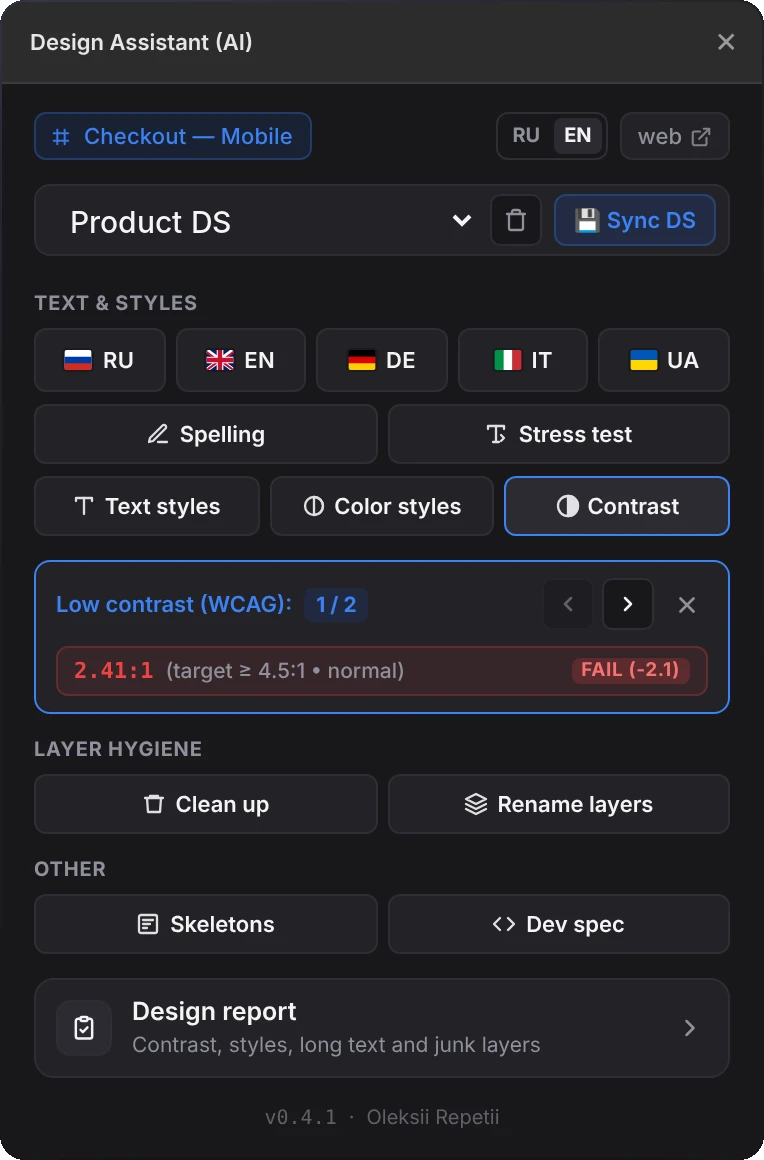
The plugin takes over the routine around a layout: it generates components from a description, translates and proofreads copy, checks the layout for mistakes and prepares the file for handoff to development. All in one window, without switching between services and plugins.
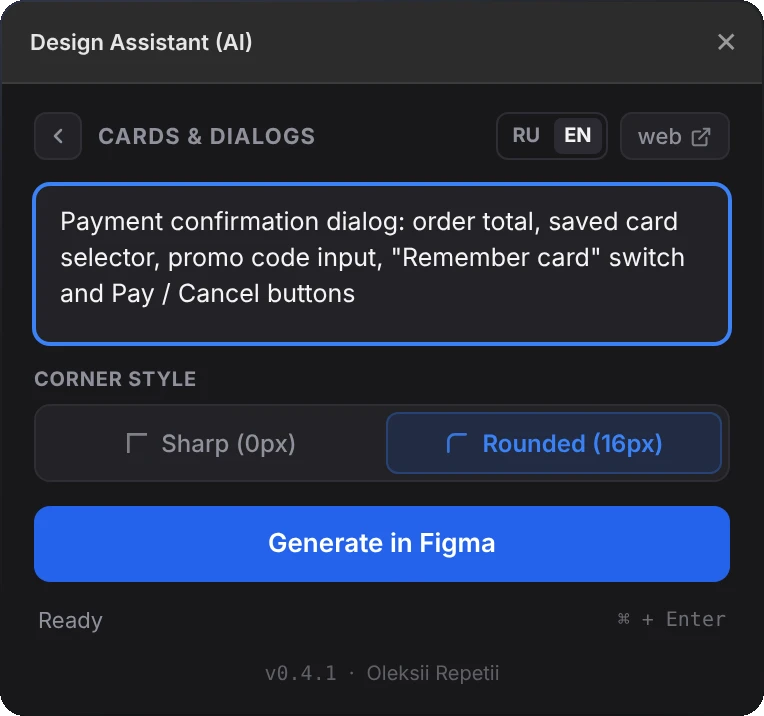
Describe a card or a dialog in words, and the plugin builds a ready auto-layout component on the canvas from 17 block types.
5 languages and spell-checking that keeps styles intact. A stress test shows right away where the layout breaks after localisation.
Finds hard-coded colours and fonts and binds them to tokens: one by one or all at once.
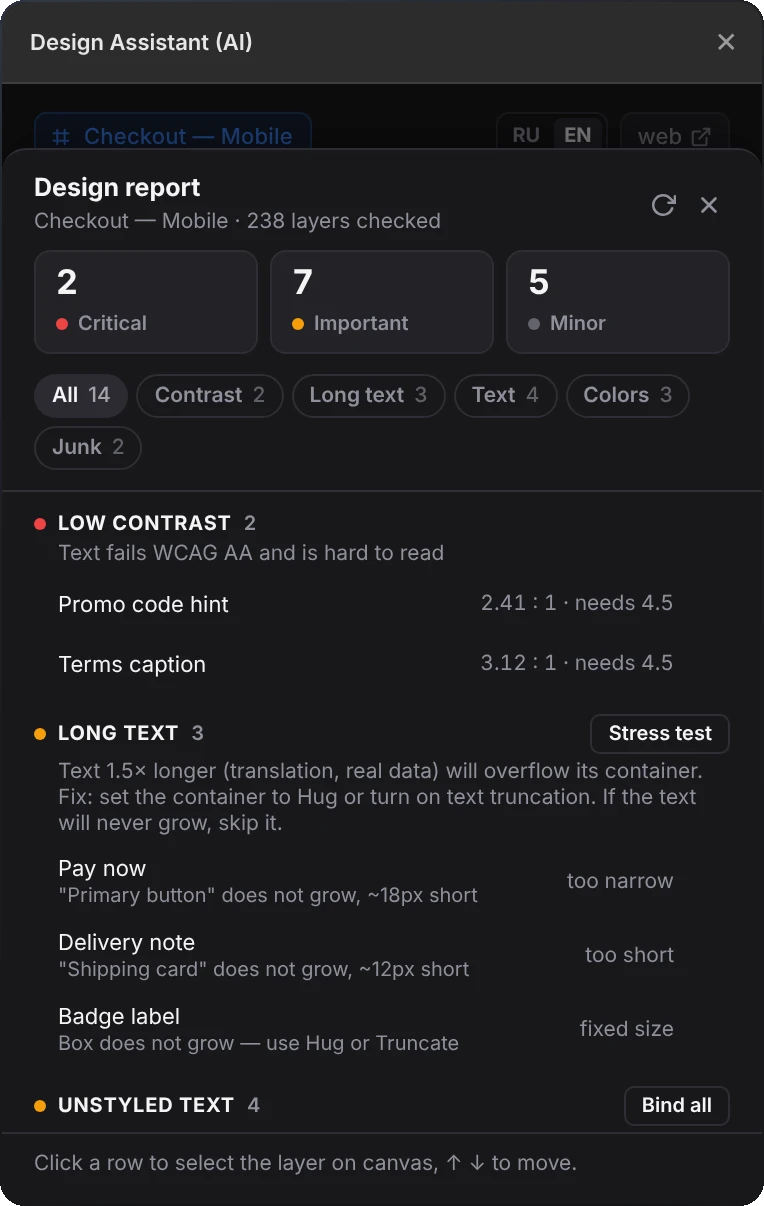
WCAG AA contrast, overlong copy, unstyled layers and clutter. Click a row to select the layer; much of it is fixed in one click.
Removes hidden layers and empty frames and gives clear names instead of “Frame 431”. Everything undoes with a single ⌘Z.
A skeleton version of the screen for loading states and an AI spec for the developer right next to the layout.
What’s next In progress
The next step, already in progress: building frontend straight from the design without a separate frontend developer and shipping changes to the product directly. The foundation is there: precise 1:1 layout against a reference and Figma styles mapped to tokens in code.
Time is money. Delegate the routine to AI and leave the decisions to the team.
Every hour a designer spends renaming states and hunting for broken styles is an hour not invested in making the product better. Now that work can be sped up, and the team can spend the freed time looking for better solutions.